Amazon Shipping Label SKU Injector
Amazon SKU Injector reads the product SKU from each invoice page in an Amazon label + invoice PDF and prints it on the matching shipping label, so packers can see what to pack without turning to the invoice.
What the tool does
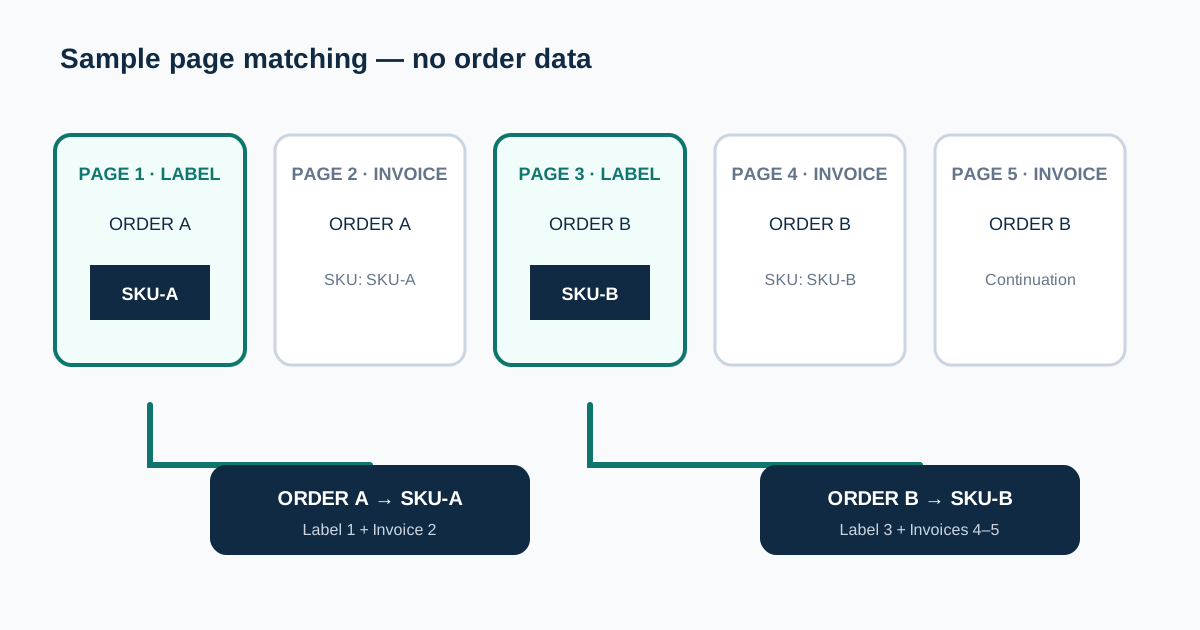
For each shipping label, it groups the matching invoice pages and reads the SKU from the product description. It prints "SKU = N Qty" in a white-on-black box, or just the SKU if the quantity cannot be confirmed or you turn off "Include item quantity".
You choose where the box goes: Above Station Box (the default), Top Right Margin, Bottom Center, or a custom X/Y position in points. If a SKU cannot be identified uniquely, the label is kept without a stamp and the order preview explains why.
What you get
A new PDF contains only the shipping-label pages, sorted by SKU, with labels without a confirmed SKU at the end. Invoices and continuation pages are not included, so keep your original download if you need them.
Each label keeps its original page size — the tool does not crop Amazon labels to 4×6 or any thermal size. Pages are rebuilt as 300 DPI images for sharp printing, so text in the output cannot be selected or copied.
Before you upload
Upload one original Amazon PDF with selectable text. A label may have multiple invoice pages, and odd page counts are supported. Order IDs are checked where available; otherwise invoices must follow their label. Unlock password-protected files first.
After upload, the order preview shows each shipping label, its matched invoice page numbers, its SKU, and any warnings. Unrecognized pages or conflicting order IDs stop processing rather than risking a wrong label.
Limitations
The tool reads explicit SKU fields or parentheses within the invoice product table. Scanned PDFs without selectable text cannot be matched automatically.
Different product SKUs or conflicting quantities in one order are flagged for review instead of being combined into a guessed stamp. Print one test page to make sure the selected position does not cover barcodes or routing details.
How page matching avoids wrong SKUs
The processor identifies shipping-label pages and invoice pages independently instead of assuming every order always uses two pages. It supports invoice continuation pages and odd total page counts, then checks order identifiers where Amazon supplies them.
A conflicting order ID, duplicate candidate label, missing invoice, or ambiguous product SKU is reported for review. The tool does not borrow the next invoice's SKU merely because it is nearby, which prevents one uncertain page from shifting every later order.
Final checks before a packing run
Compare the detected order count with the label count shown in the Amazon export. Open several preview entries from the beginning, middle, and end of the batch, and confirm the stamped SKU matches the product description on its listed invoice pages.
Download the label-only result only after warnings are understood. Print one sample at the original page size and verify that the black SKU box is readable without covering the station box, QR codes, address, or courier barcode.