Label Crop for shipping PDFs
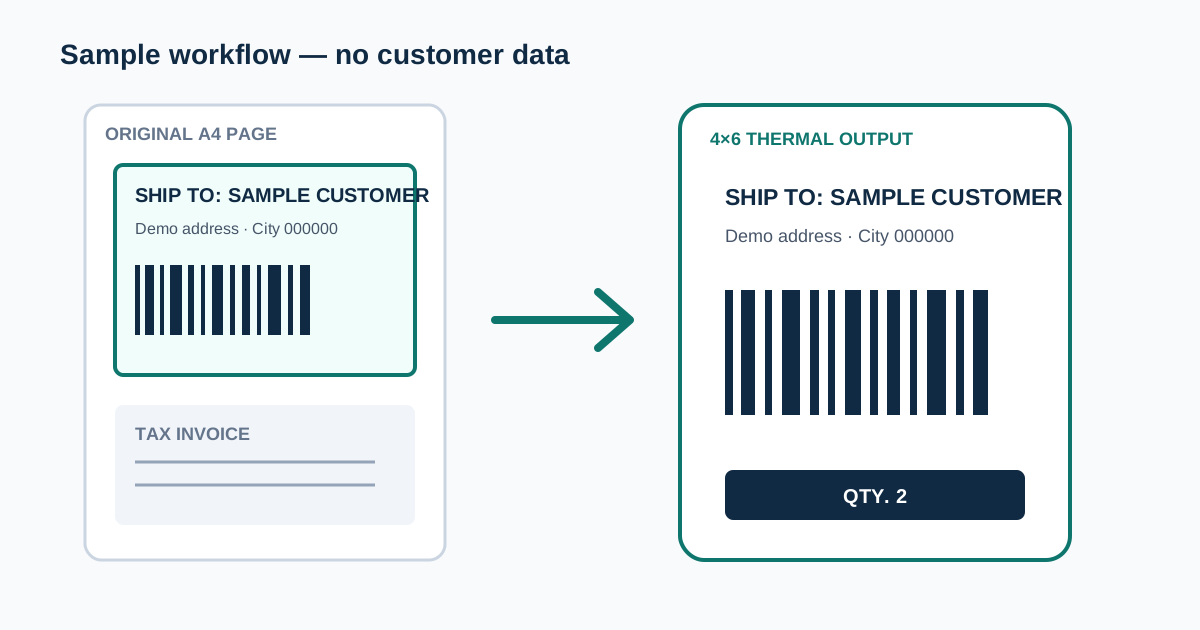
Label Crop turns the A4 label PDFs you download from Flipkart or Meesho into one sticker-sized page per order, ready for a thermal printer. Everything runs in your browser.
Before you start
Use the shipping-label PDF downloaded from your Flipkart or Meesho seller panel. Upload one PDF at a time, up to 25 MB. Each page is treated as one order's label, and you get one sticker page for every page in the file.
Password-protected PDFs cannot be read — unlock or download the file again first. Amazon label PDFs are not cropped here; Amazon SKU Injector stamps SKUs on Amazon labels but keeps their full page size.
Choosing Flipkart or Meesho
Pick Flipkart or Meesho before you upload. The tool then checks the file name and the text on the first pages. If the PDF is clearly from the other marketplace, it switches for you and shows a message; if it is not sure, it keeps your choice and shows a warning so you can switch manually.
If the file looks like an Amazon label PDF, the tool stops and points you to Amazon SKU Injector instead.
Output sizes
Choose the size of your sticker roll: 3×5 inch (76 × 127 mm), 4×5 inch (100 × 127 mm) or 4×6 inch (100 × 150 mm). Flipkart starts on 3×5 and Meesho on 4×6, and you can change the size before cropping.
"Cropped only" keeps the cropped label without resizing it to a sticker size.
How Flipkart and Meesho labels are cropped
Flipkart: the shipping label at the top of each page is cropped to its black border and kept as sharp vector content. It is fitted inside the sticker without stretching, with a small margin at the top and bottom. When the label's QTY column adds up to more than 1, a black "QTY. N" bar is printed at the bottom so packers notice multi-quantity orders.
Meesho: the crop runs from the top of the page down to the TAX INVOICE heading, so the Product Details table (SKU, size, quantity) is included. The label is turned 90° so the wide layout fits a portrait sticker, and it is stretched to fill the 3×5, 4×5 or 4×6 page — text can look wider than on the A4 original. Labels with several products keep their full Product Details table.
Preview, download and print
When cropping finishes, the result opens in a preview where you can check every page, then download or print it. You can cancel while a large file is being cropped.
For printing, set your printer's paper size to the same sticker size you chose and print at 100% ("Actual size"), not "Fit to page". Printers and drivers differ, so print one test label before a full batch.
Troubleshooting
Label prints small, shifted or with blank stickers: the printer's paper size or scaling does not match the PDF. Set both to your sticker size and 100% scale.
Wrong area cropped or part of the label missing: check that the right marketplace is selected. Cropping is designed for standard Flipkart and Meesho label PDFs; edited, merged or scanned files may not crop correctly.
"Could not crop labels from this PDF": the file may be damaged or locked. Download the label PDF again from your seller panel and retry.